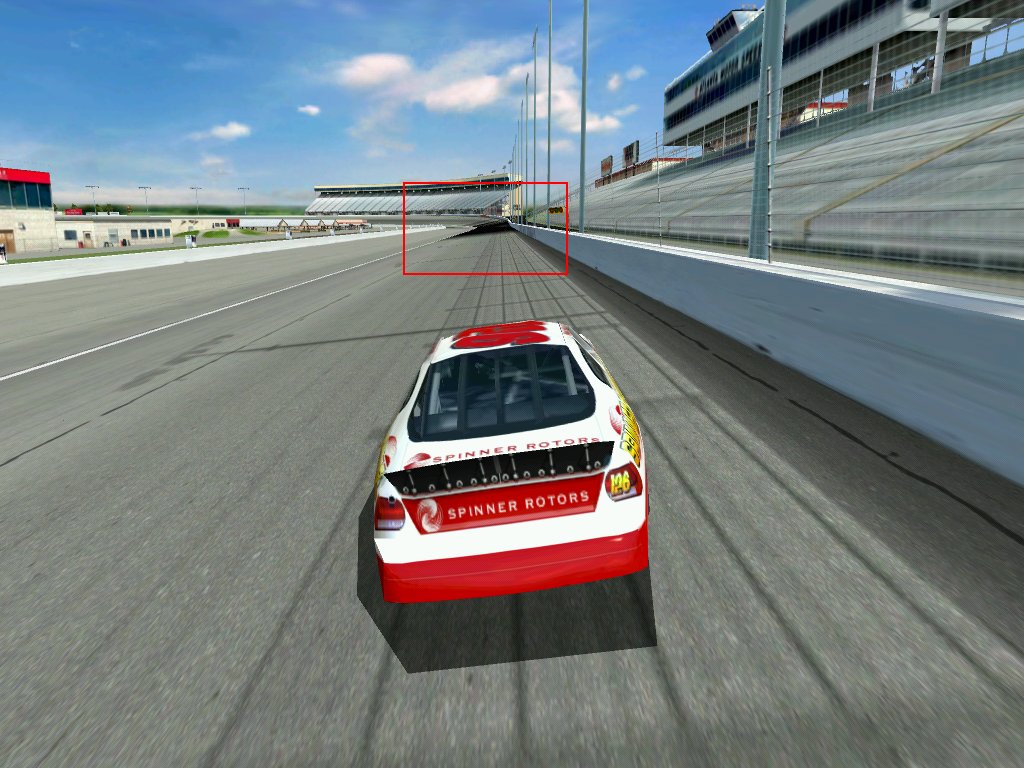
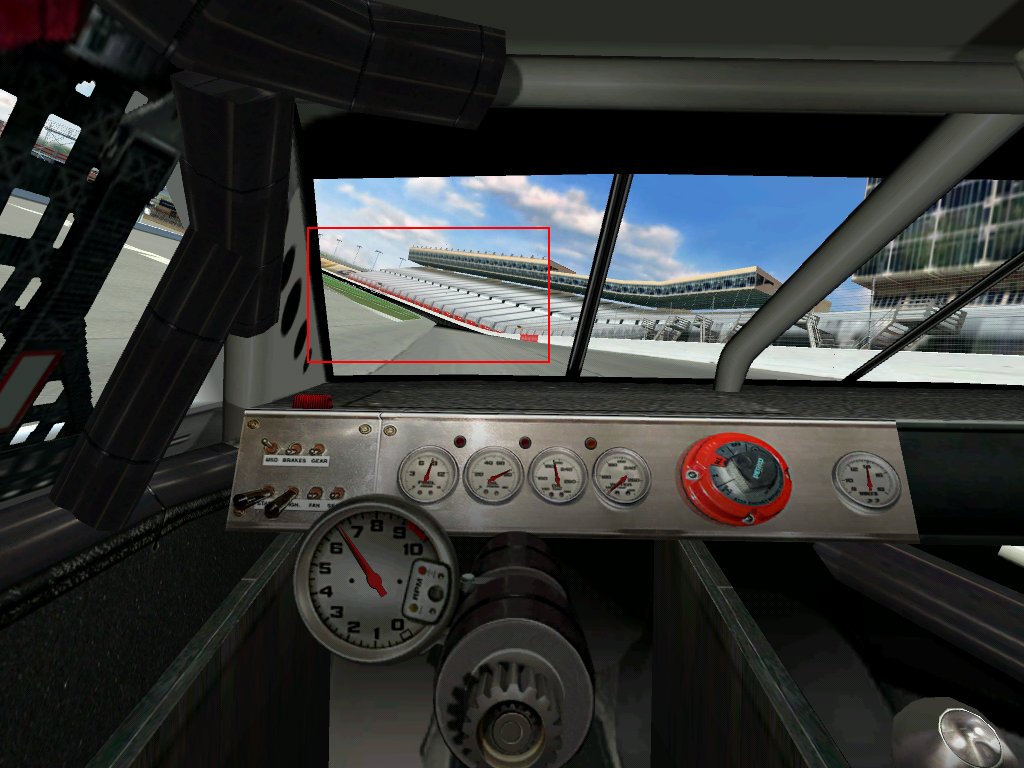
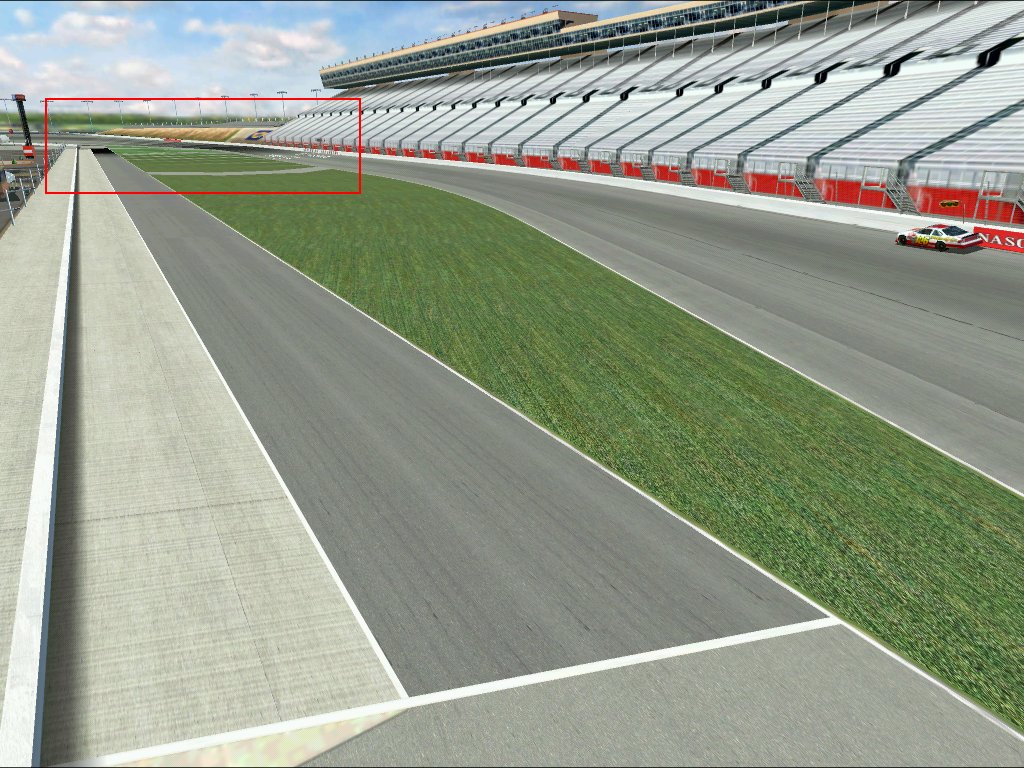
see the following links to screenshots:
the mip mapping seems to be corrupted using the latest drivers, the
only cure is disabling the mip mapping completely which looks very
very bad indeed. Older driver revisions show the same. Papyrus: f you
could find a way to fix this for the final version it would be really
appreciated. The framerates are excellent with the V5 (better than
N4).
http://www.racelive.de/NR2002DEMOss001.jpg
http://www.racelive.de/NR2002DEMOss004.jpg
http://www.racelive.de/NR2002DEMOss005.jpg
happens in all resolutions / color depths.
cheers,
Alexander Marx
mailto: alex(dot)marx(at)gmx(dot)de
Turn your mirror on and you will see it chase you down the track as well.
I have found changing screen resolutions will also change the color of the
corruption. I started with a bright orange/red, I've seen white, and blue
and black. And yellow on the apron, also white and black on the apron. I
think this depends on the inside stripe color somewhat. I did manage to run
in a window with 32 bit color at one size down from my desktop rez and it
went away...but the next session with the same settings it was there again.
dave henrie
"Alexander Marx" <[email hidden]> wrote in message
news:[email hidden]...
Quoted text (19 lines)
> see the following links to screenshots: > > the mip mapping seems to be corrupted using the latest drivers, the > only cure is disabling the mip mapping completely which looks very > very bad indeed. Older driver revisions show the same. Papyrus: f you > could find a way to fix this for the final version it would be really > appreciated. The framerates are excellent with the V5 (better than > N4). > > http://www.racelive.de/NR2002DEMOss001.jpg > http://www.racelive.de/NR2002DEMOss004.jpg > http://www.racelive.de/NR2002DEMOss005.jpg > > happens in all resolutions / color depths. > > cheers, > Alexander Marx > > mailto: alex(dot)marx(at)gmx(dot)derun the 3dconfig untility and don't choose the T&L option,, after
this you shouldn't have any texture corruption..
Transform and Lighting is for GeForce2 only (correct if I'm wrong)
On Tue, 01 Jan 2002 15:17:18 +0100, Alexander Marx <[email hidden]>
wrote:
Quoted text (19 lines)
>see the following links to screenshots: > >the mip mapping seems to be corrupted using the latest drivers, the >only cure is disabling the mip mapping completely which looks very >very bad indeed. Older driver revisions show the same. Papyrus: f you >could find a way to fix this for the final version it would be really >appreciated. The framerates are excellent with the V5 (better than >N4). > >http://www.racelive.de/NR2002DEMOss001.jpg >http://www.racelive.de/NR2002DEMOss004.jpg >http://www.racelive.de/NR2002DEMOss005.jpg > >happens in all resolutions / color depths. > >cheers, >Alexander Marx > >mailto: alex(dot)marx(at)gmx(dot)de
<Rich#8> wrote in message news:[email hidden]...
> run the 3dconfig untility and don't choose the T&L option,, after
> this you shouldn't have any texture corruption..
>
> Transform and Lighting is for GeForce2 only (correct if I'm wrong)
You're wrong. :-) GF2, GF3, and all ATI Radeon cards do T&L.
And 3dfx V4 & V5 cards can 'use' TnL settings and actually see a framerate
benefit, but at least with N4, the graphic corruption made it
unusable.(holes in the sides of cars, missing textures in the cockpit etc.)
dave henrie
"Zardoz" <[email hidden]> wrote in message
news:ndnY7.57$[email hidden]...
Quoted text (11 lines)
> > <Rich#8> wrote in message news:[email hidden]... > > run the 3dconfig untility and don't choose the T&L option,, after > > this you shouldn't have any texture corruption.. > > > > Transform and Lighting is for GeForce2 only (correct if I'm wrong) > > You're wrong. :-) GF2, GF3, and all ATI Radeon cards do T&L. > > >On Tue, 01 Jan 2002 18:41:29 GMT, "Dave Henrie" <[email hidden]>
wrote:
How do you do this, not select TnL?
thanks
deeze
Quoted text (18 lines)
> And 3dfx V4 & V5 cards can 'use' TnL settings and actually see a framerate >benefit, but at least with N4, the graphic corruption made it >unusable.(holes in the sides of cars, missing textures in the cockpit etc.) >dave henrie >"Zardoz" <[email hidden]> wrote in message >news:ndnY7.57$[email hidden]... >> >> <Rich#8> wrote in message news:[email hidden]... >> > run the 3dconfig untility and don't choose the T&L option,, after >> > this you shouldn't have any texture corruption.. >> > >> > Transform and Lighting is for GeForce2 only (correct if I'm wrong) >> >> You're wrong. :-) GF2, GF3, and all ATI Radeon cards do T&L. >> >> >> >
"Dave Henrie" <[email hidden]> wrote in message
news:tpnY7.5789$4d5.37069@rwcrnsc54...
> And 3dfx V4 & V5 cards can 'use' TnL settings and actually see aframerate
> benefit, but at least with N4, the graphic corruption made it
> unusable.(holes in the sides of cars, missing textures in the cockpitetc.)
> dave henrie
I never saw a frame rate benefit on my V5. I did see lot's of graphical
corruption using that option though. Let's face it, 3DFX added that option
purely so they could just make it look like the V5 was capable of doing T&L
and compete with Nvidia. The fact is, the V5 method uses the cpu to do that
stuff and is not a feature of the video card and to say it can 'use' T&L is
misleading.
"Joe Schlomoe" <[email hidden]> wrote in message
news:[email hidden]...
> On Tue, 01 Jan 2002 18:41:29 GMT, "Dave Henrie" <[email hidden]>
> wrote:
> How do you do this, not select TnL?
> thanks
>
> deeze
Under OpenGL it is not selectable, OpenGL uses it automatically if it
detects a card with the capability. Under D3D you can usually select either
D3D or D3D T&L Hal. In some games you just select T&L or unselect in the
options screen.
I have not be able to run either game in 32 bit color with my v5 5500. I am
using the latest AmigaMerlin dirvers. If anyone has some information about
how to run this in 32bit color, or a driver recommendation
Thanks,
Btgoss
--
btgoss
btgoss(my_shorts)@yahoo.com
Remove my shorts to reply
"post-O-matic" <[email hidden]> wrote in message
news:x%HY7.171$[email hidden]...
>
> "Dave Henrie" <[email hidden]> wrote in message
> news:tpnY7.5789$4d5.37069@rwcrnsc54...
> > And 3dfx V4 & V5 cards can 'use' TnL settings and actually see a
> framerate
> > benefit, but at least with N4, the graphic corruption made it
> > unusable.(holes in the sides of cars, missing textures in the cockpit
> etc.)
> > dave henrie
>
> I never saw a frame rate benefit on my V5. I did see lot's of graphical
> corruption using that option though. Let's face it, 3DFX added that option
> purely so they could just make it look like the V5 was capable of doing
T&L
> and compete with Nvidia. The fact is, the V5 method uses the cpu to do
that
> stuff and is not a feature of the video card and to say it can 'use' T&L
is
> misleading.
>
>
Yeah, but not Voodoo.
So his recommendation stands :)
-Larry
"Zardoz" <[email hidden]> wrote in message
news:ndnY7.57$[email hidden]...
Quoted text (11 lines)
> > <Rich#8> wrote in message news:[email hidden]... > > run the 3dconfig untility and don't choose the T&L option,, after > > this you shouldn't have any texture corruption.. > > > > Transform and Lighting is for GeForce2 only (correct if I'm wrong) > > You're wrong. :-) GF2, GF3, and all ATI Radeon cards do T&L. > > > set your desktop to 32bit and try that
I have the amigamerlins but never tried them...I am using X3dfx drivers from
november 2001. Turn on the Guardband clip option, that's good for about 3
more fps...
dave henrie
"btgoss" <[email hidden]> wrote in message
news:HGIY7.8343$[email hidden]...
> I have not be able to run either game in 32 bit color with my v5 5500. Iam
option
Quoted text (23 lines)
> using the latest AmigaMerlin dirvers. If anyone has some information about > how to run this in 32bit color, or a driver recommendation > Thanks, > Btgoss > -- > btgoss > btgoss(my_shorts)@yahoo.com > > Remove my shorts to reply > "post-O-matic" <[email hidden]> wrote in message > news:x%HY7.171$[email hidden]... > > > > "Dave Henrie" <[email hidden]> wrote in message > > news:tpnY7.5789$4d5.37069@rwcrnsc54... > > > And 3dfx V4 & V5 cards can 'use' TnL settings and actually see a > > framerate > > > benefit, but at least with N4, the graphic corruption made it > > > unusable.(holes in the sides of cars, missing textures in the cockpit > > etc.) > > > dave henrie > > > > I never saw a frame rate benefit on my V5. I did see lot's of graphical > > corruption using that option though. Let's face it, 3DFX added thatQuoted text (11 lines)
> > purely so they could just make it look like the V5 was capable of doing > T&L > > and compete with Nvidia. The fact is, the V5 method uses the cpu to do > that > > stuff and is not a feature of the video card and to say it can 'use' T&L > is > > misleading. > > > > > >The only reason that 3dfx gave us that option was to take care of
those games that might look for TnL before turning on some options.
As far as TnL goes having just finished a benchmark test of the
Geforce 3 vs V5 I have to say that TnL is overated in this sim. N4
runs just as fast in N4 as Geforce 3.
PAPA DOC
Pierre PAPA DOC Legrand
Never Forget Never Forgive
September 11, 2001
We Will Find You